

iPhone Calendar Sync
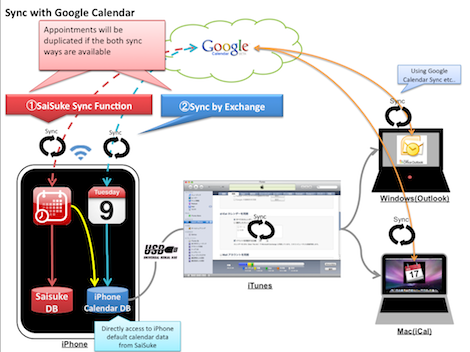
Ver. 1.30 has supported the iPhone Calendar App's database access. You can use iPhone Calendar App's Calendars (Google Calendar, MobileMe Calendar etc...) in SaiSuke.
If you use sync function both SaiSuke and iPhone Calendar, you may find duplicated appointments in SaiSuke. To fix the duplicate, you can use two ways, 1.SaiSuke Sync Function or 2.Sync byExchange.
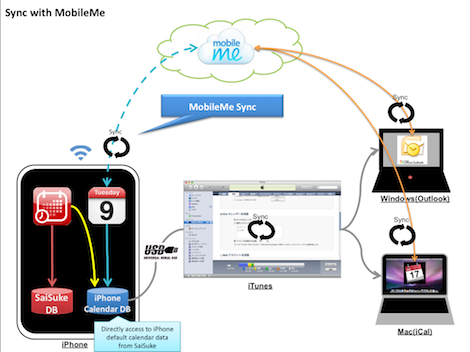
You can use MobileMe Calendar like the image above. SaiSuke can't access MobileMe directly, but can access to iPhone Calendar. SaiSuke can be the replacement for iPhone Calendar App.
1.SaiSuke Sync Function
To select 1. SaiSuke needs setting below:
・Delete Google Calendar account(Exchange) from iPhone settings.
or unselect iPhone Calendar from SaiSuke settings.
・Select Calendar in Google Calendar group to create/edit appointment. Do not select Calendar in iPhone's Calendar group.
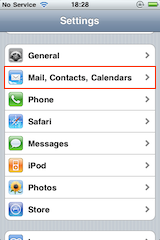  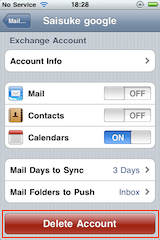 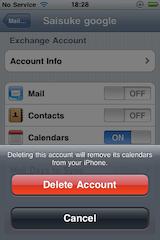 |
Delete Google Calendar account(Exchange) from iPhone settings "Settings" in iPhone -> "Mail, Contacts, Calendars" Select Google Calendar account(Exchange) Tap Delete Account |
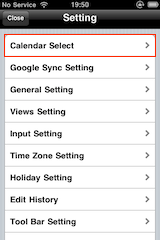 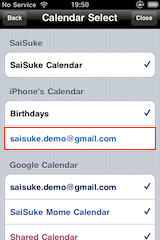 |
Unselect iPhone Calendar from SaiSuke settings "Setting" -> "Calendar Select" Tap Google Calendar(Exchange) in iPhone's Calendar group and uncheck
|
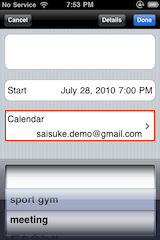 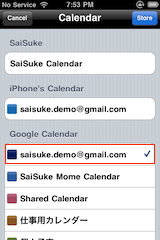 |
Create/Edit Appointment Tap Calendar in Appointment Dialog Select Calendar in Google Calendar group Do not select Calendar in iPhone's Calendar group |
2.Sync by Exchange
To select 2. SaiSuke needs setting below:
・Unselect Calendars in Google Calendar group from SaiSuke settings.
・Select Calendar in iPhone Calendar group to create/edit appointment.
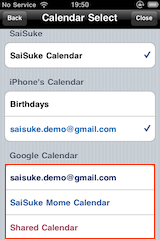 |
Unselect Google Calendar from SaiSuke settings "Setting" -> "Calendar Select" Tap Calendars in Google Calendar group and uncheck Check Calendars in iPhone's Calendar group |
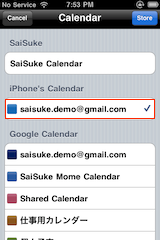 |
Create/Edit Appointment Tap Calendar in Appointment Dialog Select Calendar in iPhone's Calendar group Do not select Calendar in Google Calendar group |